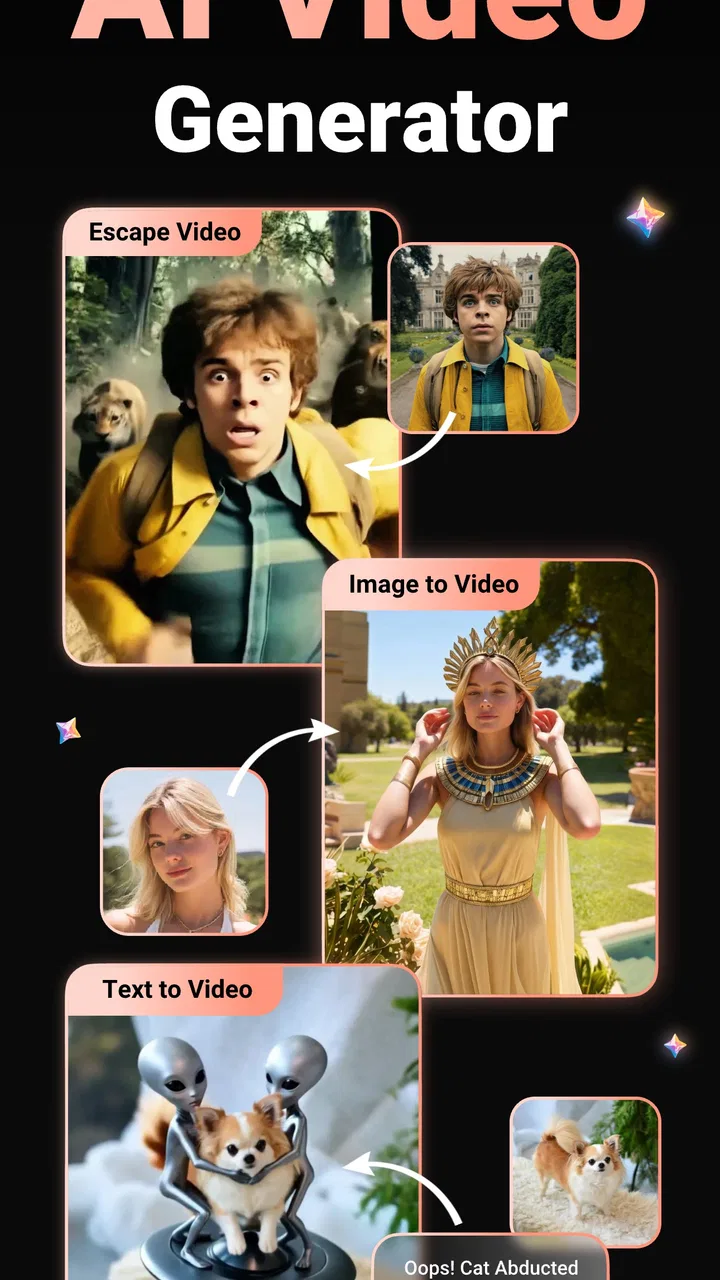
AI Video Generator Viddo Maker
- 4.4
- Rating
- 5.00M
- Installs
- Free
- Price

 Analysis by App-foxy
AI Video Generator Viddo Maker is the kind of app I open when I want to turn a simple idea into something visual without building a project from scratch. It sits in the video players and editors category, but its focus is different from a traditional timeline editor: instead of beginning with clips, cuts, and layers, I begin with an image or a written prompt and see what an AI-generated video can make from it. That makes the experience approachable for quick experiments, social posts, visual jokes, and creative concepts that would normally take much longer to produce.
After spending time with it, my view is fairly clear. Viddo is most useful as a fast idea-to-video tool, not as a complete replacement for a conventional editor. It can reduce the distance between “I have an image” and “I want movement, atmosphere, or a short visual story,” but the result still depends heavily on the source material, the prompt, and how much patience I have for trying again. The app is free to install, carries a Mature 17+ age rating, and includes purchases ranging from around one dollar to nearly two hundred and fifty dollars per item, so I would approach its creative tools with both curiosity and attention to the purchase flow.
How the app feels when reading and navigating
The first thing I notice with an AI video maker is whether I can understand what to do before being asked to make a decision. Viddo presents several creative directions, including image-to-video, text-based generation, action-figure-style concepts, and anime-inspired results. That variety is appealing, but it can also make the opening experience feel busier than a basic editor. A person who already knows whether they want to animate a photo or create a scene from words will have an easier time than someone arriving without a clear goal.
You May Also Like

 Blood Strike: 2.5 Anniversary
Blood Strike’s Loadouts Turn Every Drop Into a Tactical Gamble
A close look at Blood Strike’s custom loadouts: how fast access to signature weapons reshapes its battle royale rhythm, rewards preparation, and narrows the gap between fights.

 Pandora - Music & Podcasts
Pandora’s Music Is Easy to Start, but Harder to Recover
Pandora’s strength is its low-effort path from a seed to a station. Its weak spot is how much confidence it asks you to place in connection, setup, and quiet recovery.

 8 Ball Pool
 Is Built on Rivalries, Rematches, and Routine
A close look at the rivalries, rematches, shared routines, and unanswered safety questions that turn a quick pool match into a persistent mobile community.

 Samsung Music
’s Quiet Strength Is Playing What You Already Own
Its reach comes less from spectacle than from dependable access to a personal library. That simplicity is both the app’s strongest retention engine and its ceiling.

 AccuWeather: Weather Radar
AccuWeather Review: A Quick, Clear Forecast for Everyday Decisions
For everyday plans, the best forecast is the one you can understand quickly. AccuWeather makes rain timing, radar, and local conditions easy to act on, with a few trade-offs.

 Hill Climb Racing
Why Hill Climb Racing Still Turns Crashes Into One More Run
A tiny car, a bumpy hill and one more upgrade: Hill Climb Racing keeps resurfacing because its simple chaos makes every near-miss feel personal.
More From Our News Desk



I find the image-first workflow easier to understand than the more open-ended prompt workflow. When I start with a picture, I have something concrete to inspect: the subject, the background, and the part I want to bring to life. A written prompt asks me to imagine the outcome before seeing it, which creates more room for disappointment. My practical advice is to begin with one visual idea rather than a long description. Short prompts are easier to adjust, and they make it clearer which change produced a better result.
Readability matters here because AI tools often use short labels, visual previews, and promotional examples instead of detailed explanations. I would not expect every option to be self-explanatory on the first visit. If I were helping a less confident user, I would sit with them through the first creation, point out which control starts the generation process, and explain that an imperfect first result is normal rather than a sign that they have used the app incorrectly.
The developer is listed as AI Music AI Video Generator, AI Chat AI Girlfriend, which is worth noticing because the name suggests a broader group of AI products rather than a narrowly focused editing studio. That does not make the video tools less useful, but it does help set expectations: Viddo feels like a collection of quick creative generators, not a carefully structured professional post-production environment.
The app has a 4.4 average from around two hundred and sixty-three thousand ratings, with over five million installs. Those figures suggest that the concept has reached a substantial audience, but they do not tell me whether every generation will match my expectations. AI output is inherently variable, so I judge the app less by the promise of a perfect result and more by how quickly it helps me discover something usable.
Making the interface less demanding
For better readability, I would prepare the material before opening the generator. A clearly framed image with one obvious subject gives me fewer things to interpret than a crowded group photo. I also keep my intended outcome simple: gentle movement, a transformation, or a short mood piece. This is more effective than trying to describe camera direction, character action, lighting, and a complete plot in one prompt.
Another useful habit is to treat each generation as a draft. I do not spend too long trying to perfect a sentence before seeing what the app does with it. Once I have a first result, I can identify the real problem: perhaps the subject moves too much, the background changes, or the visual style is not strong enough. That trial-and-adjust loop is easier to follow than attempting to predict the AI’s interpretation from the beginning.
Motor and sensory considerations in everyday use
AI generation can remove some of the physical effort associated with video editing. I do not need to drag a playhead through a long timeline, trim several tracks, or place transitions with exact finger movements just to produce a short visual. For users who find precise touch gestures tiring or difficult, a prompt-led workflow may be a welcome alternative. The main creative action becomes choosing an input, writing an instruction, and reviewing the result.
That advantage has limits. The app still requires tapping through choices, entering text, comparing previews, and deciding whether to keep or regenerate an output. If the interface presents several small controls close together, users with limited dexterity may need more time and concentration. I would use the device in a stable position rather than holding it in one hand, especially during repeated attempts. A stylus or an accessibility setting already available on the phone may also make selection more comfortable, but the benefit will depend on the individual device and user.
For people sensitive to motion, animated previews can be tiring even when the final video is short. I would review generated content in a calm setting and stop if the movement feels uncomfortable. The app’s creative appeal comes from motion, so it is not the best choice for someone who wants a completely static, predictable visual workspace. A traditional image editor may be a better fit when still images are enough.
Visual interpretation is another important point. AI results can contain odd changes in faces, hands, clothing, object shapes, or background details. These problems may be easy for one viewer to overlook and very distracting for another. I recommend checking the entire output rather than judging it from the first frame. A result that looks convincing in a thumbnail can reveal distracting movement once it plays.
Audio and environmental conditions also affect the experience, even when the main task is visual. In a noisy place, I would not rely on casually watching a preview to understand whether it works; I would use a quiet review later or share it with someone I trust. In bright sunlight, reflections can make subtle movement harder to inspect. These are ordinary phone-use issues, but they matter more when the decision to keep or regenerate depends on small visual details.
Why simple source material helps
One of the less obvious strengths of this kind of tool is that it can make an ordinary personal image feel more expressive without requiring advanced editing knowledge. A pet portrait, a travel snapshot, or a handmade illustration can become a short animated experiment. The trade-off is that the AI has to infer what should move. A clean subject against a relatively simple background gives it a clearer task than a dim photograph with overlapping people and objects.
I also avoid treating the generator as a repair tool. If an image is already blurry, poorly framed, or difficult to interpret, animation can emphasize its weaknesses rather than hide them. Improving the source image first, even with a basic crop or brightness adjustment, often gives me a more coherent starting point. That extra step is easy to skip because the AI feature feels like it should solve everything, but it makes a noticeable difference to the usefulness of the result.
Using Viddo in different situations
Viddo makes the most sense when I need a quick visual and do not want to learn a full editing suite. Imagine preparing a birthday message for a friend after finding one good photo and a short idea such as “make this feel like a cheerful celebration.” I can test an animated version, review whether the subject remains recognizable, and decide whether the result is charming enough to share. The process is faster and less intimidating than opening a desktop editor with a blank timeline.
It is also suited to brainstorming. If I am planning a short social video, I can use the text-based generator to explore a mood or visual direction before committing time to filming. I would not treat the generated clip as the final production automatically. Instead, I use it as a rough visual reference: it can help me decide whether an anime look, an action-figure concept, or a more natural image treatment fits the idea.
For educators, families, and community groups, the app could be useful for creating an attention-grabbing visual from a still illustration or a short concept. However, the Mature 17+ rating means I would not hand it to younger users without adult judgment and supervision. The rating is especially relevant when the app includes a broad set of AI-oriented creative experiences rather than a single tightly limited classroom function.
People who post frequently may appreciate the ability to generate variations without filming themselves. Someone who is uncomfortable appearing on camera can begin with artwork, objects, or existing images and create a visual post around them. That does not eliminate the need to check ownership and consent. I would only use images I have permission to edit and share, particularly when they include other people.
Situational access is where I see both the strongest benefit and the clearest weakness. On a phone, I can work during a short break, while commuting, or away from a computer. That convenience is valuable for spontaneous ideas. At the same time, generation and review are less comfortable on a small screen than on a larger display, and mobile use can encourage rushed decisions. I prefer creating drafts on the phone and doing a careful final check before publishing.
Where traditional editors remain better
Compared with a conventional mobile video editor, Viddo reduces manual work but gives me less direct control over the exact motion. In a timeline editor, I can decide precisely when a clip starts, where a transition occurs, and which frame remains on screen. With an AI generator, I describe the desired result and accept a degree of interpretation. That is a fair exchange for speed, but it matters if timing and repeatability are central to the project.
Compared with a slideshow maker, Viddo is more imaginative but less predictable. A slideshow is dependable: the photos appear in the order I choose, and the transitions behave consistently. Viddo can produce a more striking result, yet the subject may move in an unexpected way or the style may drift from the source. I choose the app when novelty matters more than strict accuracy.
Compared with a professional desktop editor, the difference is even larger. Viddo is easier to approach for a quick concept, while professional software is better for multi-scene storytelling, detailed sound work, color management, and exact delivery requirements. I would not use this app as the only tool for a client project that needs frame-level control. I would use it as a sketching companion or as a way to generate a starting point.
Remaining barriers before I would recommend it
The biggest barrier is expectation management. The words “AI video” can make a user imagine a finished, polished sequence from one sentence. In practice, I get better results when I provide a suitable image, keep the instruction focused, and accept that several attempts may be part of the process. Someone who wants a guaranteed result on the first try may find the experience frustrating.
Cost also deserves attention. The app is free, but in-app purchases can range from around one dollar to nearly two hundred and fifty dollars per item. I would inspect each purchase screen carefully, especially if I were testing multiple generations or letting another person use the device. The free entry point makes experimentation accessible, but it does not mean every creative path will remain free.
Generation time can also affect access in a practical sense. A person with limited time, limited data, or an older phone may not enjoy repeated experimentation as much as someone with a comfortable setup. I would avoid starting an important project immediately before a deadline. The safest workflow is to make a few drafts early, save the strongest result, and leave room for a backup plan using a normal editor or a still image.
There is also a content judgment barrier. AI-generated visuals can unintentionally resemble real people, alter personal images in uncomfortable ways, or create scenes that are inappropriate for the intended audience. I review every result before sharing it, and I consider whether the transformation respects the people and subjects shown. The Mature 17+ rating reinforces the need for adult judgment rather than automatic sharing.
The app’s current version is 4.3.9.1, and it supports devices running operating system version 9 or later. That gives it a fairly broad technical starting point for compatible phones, but compatibility alone does not guarantee a comfortable experience. Screen size, processing performance, battery condition, and the user’s familiarity with prompt-based tools can matter just as much.
Who should choose it, and who should skip it
I would recommend Viddo to curious creators, casual social users, and anyone who has a strong image but no desire to learn a complex editor. It is particularly appealing when the goal is to explore several visual directions quickly. People who enjoy playful styles such as anime or action-figure-inspired concepts will likely get more from it than users seeking strictly naturalistic animation.
I would suggest another option to a user who needs exact timing, reliable continuity, detailed audio editing, or a repeatable professional workflow. I would also steer away from it for a child’s unsupervised creative activity because of the Mature 17+ rating. Someone with motion sensitivity may prefer a still-image tool, while someone with limited dexterity should test the interface personally before committing to repeated generation sessions.
For accessibility, I would describe the app as potentially helpful rather than universally accessible. Its prompt-led approach can reduce the need for precise timeline editing, but it still depends on touch navigation, reading short interface labels, inspecting moving previews, and making repeated choices. The right question is not whether it removes every barrier; it is whether its particular workflow removes the barrier that matters most to that user.
My inclusive verdict after using the generator
Viddo succeeds when I treat it as a creative accelerator. It gives me a way to animate an idea from an image or a sentence, test styles that would be time-consuming to build manually, and create something shareable without opening a professional editing suite. Its broad appeal is reflected in its large user base, but the experience still rewards realistic expectations and careful review.
I like that the app can make video creation feel less physically demanding than traditional editing. I can avoid a long sequence of tiny timeline adjustments and focus on the concept. For users who think visually but struggle with complex editing interfaces, that can be a meaningful advantage. The best results come from a clear source image, a short instruction, and a willingness to compare drafts rather than accepting the first output automatically.
My reservations are equally practical. The interface may feel crowded to someone who wants one obvious tool, generated motion can be unpredictable, and the purchase range means I would monitor costs closely. The Mature 17+ label also changes who I consider an appropriate user. These are not minor details; they determine whether the app feels liberating or frustrating in a particular context.
In the end, I would recommend AI Video Generator Viddo Maker to adults who want fast, imaginative video experiments and are comfortable with AI-assisted results that may need selection and refinement. I would not present it as a precision editor or a universally easy solution. If you want a playful bridge from pictures and words to moving visuals, it is worth trying. If you need dependable control, predictable accessibility, or a polished production workflow, a conventional editor will remain the better choice.
FAQs for AI Video Generator Viddo Maker
01What is AI Video Generator Viddo Maker, and what can I use it for?
AI Video Generator Viddo Maker is designed to help users create short videos with the assistance of artificial intelligence. You can typically turn written prompts, photos, or selected media into social-ready video content, depending on the tools available in your version. It may be useful for TikTok clips, Instagram Reels, YouTube Shorts, presentations, promotional content, and personal projects without requiring advanced editing experience.
02Is AI Video Generator Viddo Maker free to download and use?
The application may be available as a free download, but some features can be limited or protected by in-app purchases or a subscription. Premium access may include higher-quality exports, additional templates, faster generation, watermark removal, extra styles, or extended usage limits. Before creating a subscription, check the pricing, billing frequency, trial conditions, and cancellation rules shown in the App Store or Google Play listing.
03Do I need an internet connection to generate videos?
An internet connection is generally required for AI video generation because prompts, images, and processing requests may be handled through online servers. Basic parts of the app, such as browsing previously saved projects or adjusting some downloaded media, might work offline, but this can vary by device and app version. A stable Wi-Fi connection is recommended for large uploads and longer generated videos.
04Can I use the videos created with Viddo Maker for commercial purposes?
Commercial usage depends on the app’s current terms of service, the subscription plan you choose, and the rights associated with any templates, music, stock elements, or AI-generated material. Before using a video for advertising, client work, or monetized social media, review the licensing information carefully. You should also confirm that uploaded images, voices, logos, and other materials belong to you or are properly licensed.
05Is AI Video Generator Viddo Maker suitable for beginners, and what should I know before downloading it?
The app is aimed at users who want a simpler alternative to traditional video-editing software, so beginners can usually start with templates, prompts, and automated effects rather than a complicated timeline. However, generation quality can vary depending on the prompt and source media, and processing may take time. Check device compatibility, storage requirements, privacy permissions, watermark policies, and export limits before installing.
Pros
- Creates videos from text prompts with minimal editing experience required.
- Offers ready-made templates for social media content and promotional clips.
- AI-generated visuals can speed up brainstorming and content production.
- Supports quick customization of text
- music
- transitions
- and video styles.
- Useful for creating short videos without advanced desktop editing software.
Cons
- Output quality can vary depending on the prompt and selected style.
- Some features
- templates
- or exports may require a paid subscription.
- AI results may include awkward motion
- text errors
- or visual inconsistencies.
- Video generation can consume significant time and device resources.
- Privacy terms should be checked before uploading personal media or sensitive content.

AI Video Generator Viddo Maker
Gallery